Building a 5G network with the OpenAirInterface UE
Improving the interoperability of the OpenAirInterface (OAI) UE is an on-going effort at the Duranta project. This tutorial is based on the OAI 2026.w25 release and is intended to be used for proof-of-concept and initial testing to allow users to test OCUDU with an open source UE that is in active development. Please reach out to the Duranta community for general feedback and technical support for the OAI UE.
Overview
OCUDU is a 5G CU/DU solution and does not include a UE application. The Duranta OpenAirInterface project includes an open source 5G UE (OAI UE). Unlike the srsRAN 4G project's prototype 5G UE (srsUE), the OAI UE is in active development and is TDD capable. However, the OAI UE prior to 2026.w25 had interoperability issues with OCUDU. Without support for UCI on PUSCH, in particular for multiplexing CSI on PUSCH, the OAI UE could not operate with the OCUDU gNB in UL with CSI RS enabled. Likewise, with CSI RS disabled, DL operation required fixed MCS.
Historically, the OCUDU and Duranta projects had incompatible virtual radio interfaces, ZeroMQ (ZMQ) and RFSim respectively. The OAI 2026.w17 release introduced a compatible ZMQ radio. While not strictly required for interoperability, this feature enables testing with no hardware cost.
This tutorial shows how to create an end-to-end fully open-source 5G TDD network with OAI UE, OCUDU gNodeB and Open5GS 5G core network.
The ZMQ-based virtual radio use case is shown here. Various use cases such as over-the-air hardware setup and multi-UE emulation will be added later.
Hardware and Software Overview
For this tutorial, the following hardware and software are used:
- PC with Ubuntu 24.04.3 LTS
- OCUDU
- Duranta OpenAirInterface (2026.w25 or later)
- Two Ettus Research USRP B210s (connected over USB3)
- Open5GS 5G Core
- ZeroMQ
Ideally the USRPs would be connected to a 10 MHz external reference clock or GPSDO, although this is not a strict requirment. We recommend the Leo Bodnar GPSDO.
Duranta OpenAirInterface
If you have not already done so, install the latest version of Duranta OpenAirInterface and all of its dependencies. This is outlined in the OAI installation guide.
ZeroMQ
Building and running OAI with ZMQ radio is also documented in the OAI ZMQ README.
Open5GS
For this example, we are using Open5GS as the 5G Core.
Open5GS is a C-language open-source implementation for 5G Core and EPC. The following links will provide you with the information needed to download and set-up Open5GS so that it is ready to use with OCUDU:
For the purpose of this tutorial, we will use a dockerized Open5GS version provided in OCUDU at ocudu/docker.
ZeroMQ-based Setup
In this section, we describe the steps required to configure the ZMQ-based RF driver in both OCUDU gNB and OAI UE. The following diagram presents the setup architecture:
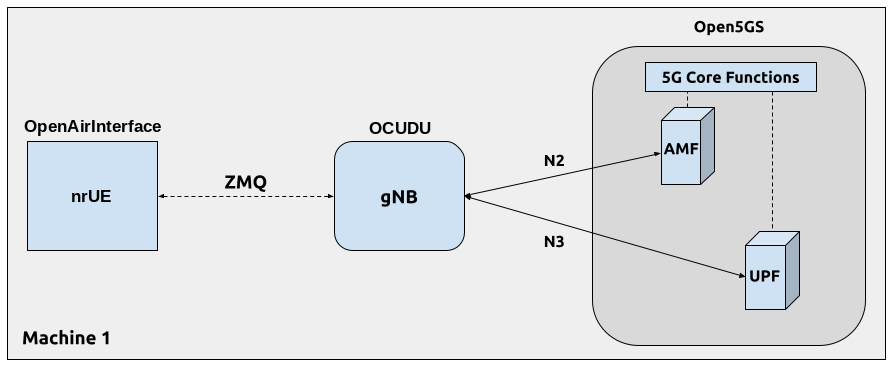
Configuration
The following config files were modified to use ZMQ-based RF driver:
Details of the modifications made are outlined in following sections.
gNB
Replacing the UHD driver with the ZMQ-based RF driver requires changing only ru_sdr sections of the gNB file:
ru_sdr:
  device_driver: zmq
  device_args: tx_port=tcp://127.0.0.1:4556,rx_port=tcp://127.0.0.1:4557
  srate: 23.04
  tx_gain: -12 # backoff from full scale, required by OAI fixed point FFT
  rx_gain: 0
Note: OCUDU TX is designed to drive DAC hardware with a signal with peak at full-scale. PHY generates this signal with a 12 dB crest factor. However, with the ZMQ interface, this signal arrives as-is at the OAI RX. OAI uses fixed point FFT, so it requires an input signal with peak well below full scale or there will be saturation in the internal FFT calculation. With radio hardware and channel in the loop, the input signal to the OAI FFT will most certainly have peak well below full scale.
The following cell configuration should be matched by the OAI UE configuration.
cell_cfg:
  dl_arfcn: 632628
  band: 78
  channel_bandwidth_MHz: 20
  common_scs: 30
TDD is enabled by default since the frequency band is n78. The following TDD configuration is provided as an example for setting the TDD pattern:
cell_cfg:
  ...
  tdd_ul_dl_cfg:
    dl_ul_tx_period: 5
    nof_dl_slots: 3
    nof_dl_symbols: 10
    nof_ul_slots: 1
    nof_ul_symbols: 2
CSI RS is enabled by default. However, when CSI RS is enabled, the number of CSI REs must greater than 0, and up to 8.
cell_cfg:
  ...
  csi:
    csi_rs_enabled: true
  pucch:
    nof_cell_csi_res: 1
OAI UE
The OAI UE UICC fields should match the subscriber database of the 5G Core Network
uicc0 = {
  imsi = "001010123456780";
  key = "00112233445566778899aabbccddeeff";
  opc= "63bfa50ee6523365ff14c1f45f88737d";
  pdu_sessions = ({ dnn = "internet";
                    nssai_sst = 1;
                    });
}
Then, the ZMQ radio driver is configured as follows:
device = {
  name = "oai_zmqdevif";
};

zmq = (
  {
    tx_channels = ( "tcp://127.0.0.1:4557" );
    rx_channels = ( "tcp://127.0.0.1:4556" );
  }
);
In addition, match the PRB/bandwith, numerology/SCS, frequency band, and ARFCN/carrier frequency configuration of the gNB:
r               = 51;
numerology      = 1;
band            = 78;
C               = 3489420000;
Enable carrier scanning to find the SSB offset automatically. Optionally, enable 3/4 FFT sample rate with the E flag to match the gNB. Finally, the UE capabilities file is required for interoperability with any third party gNB. Some example UE capabilities file provided in-tree that work with OCUDU gNB.
ue-scan-carrier = 1;
E               = 1;
uecap_file      = "../../../targets/PROJECTS/GENERIC-NR-5GC/CONF/uecap_ports1.xml";
Running the Network
Once the config files are updated, the network can be set up on a single host machine.
Open5GS Core
OCUDU provides a dockerized version of the Open5GS. It is a convenient and quick way to start the core network. You can run it as follows:
cd ./ocudu/docker
docker compose up --build 5gc
Note that we have already configured Open5GS to operate correctly with OCUDU. Moreover, the UE database is populated with the credentials used by our OAI UE.
OCUDU gNB
We run gNB directly from the build folder, i.e., ./ocudu/build/apps/gnb/, (the config file is also located there) with the following command:
sudo ./gnb -c ./gnb_zmq.yaml
The console output should be similar to:
--== OCUDU gNB (commit 76a15775c9) ==--

Lower PHY in executor sequential baseband mode.
Available radio types: uhd, zmq and realtime_loopback.
Cell pci=1, bw=20 MHz, 1T1R, dl_arfcn=632628 (n78), dl_freq=3489.42 MHz, dl_ssb_arfcn=632256, ul_freq=3489.42 MHz

N2: Connection to AMF on 10.53.1.2:38412 completed
==== gNB started ===
Type <h> to view help
The Connecting to AMF on 10.53.1.2:38412 message indicates that gNB initiated a connection to the core.
If the connection attempt is successful, the following (or similar) will be displayed on the Open5GS console:
open5gs_5gc  | 06/25 07:22:50.219: [amf] INFO: gNB-N2 accepted[10.53.1.1]:35496 in ng-path module (../src/amf/ngap-sctp.c:113)
open5gs_5gc  | 06/25 07:22:50.219: [amf] INFO: gNB-N2 accepted[10.53.1.1] in master_sm module (../src/amf/amf-sm.c:894)
open5gs_5gc  | 06/25 07:22:50.222: [amf] INFO: [Added] Number of gNBs is now 1 (../src/amf/context.c:1277)
open5gs_5gc  | 06/25 07:22:50.222: [amf] INFO: gNB-N2[10.53.1.1] max_num_of_ostreams : 30 (../src/amf/amf-sm.c:941)
OAI UE
Finally, we start OAI UE. This is also done directly from within the build folder i.e., ./openairinterface5g/cmake_targets/ran_build/build/), with the config file in the same location:
sudo ./nr-uesoftmodem -O oaiue_zmq.conf
If OAI UE connects successfully to the network, the following (or similar) should be displayed on the console:
[NAS]    Received PDU Session Establishment Accept, UE IPv4: 10.45.1.2
[SDAP]   UE 0 PDU session 1: cached QFI 1
[SDAP]   UE 0 PDU session 1: bringing TUN oaitun_ue1 up
[UTIL]   threadCreate() for ue_tun_read_0_p1: creating thread with affinity ffffffff, priority 1
[OIP]    TUN Interface oaitun_ue1 successfully configured, IPv4 10.45.1.2, IPv6 (null)
[NR_MAC] [157.7] Received TA_COMMAND 30 TAGID 0 CC_id 0
Entering ITTI signals handler
TYPE <CTRL-C> TO TERMINATE
[NR_MAC] UE 0 RNTI 4601 stats sfn: 256.4, cumulated bad DCI 0
    DL harq: 19/0
    UL harq: 9/0 avg code rate 0.9, avg bit/symbol 5.0, avg per TB: (nb RBs 7.0, nb symbols 14.0)
[NR_MAC] UE 0 RNTI 4601 stats sfn: 384.4, cumulated bad DCI 0
    DL harq: 19/0
    UL harq: 9/0 avg code rate 0.9, avg bit/symbol 5.0, avg per TB: (nb RBs 7.0, nb symbols 14.0)
It is clear that the connection has been made successfully once the UE has been assigned an IP, this is seen in Received PDU Session Establishment Accept, UE IPv4: 10.45.1.2.
The TUN Interface is then confirmed with the TUN Interface oaitun_ue1 successfully configured, IPv4 10.45.1.2, IPv6 (null) message.
Testing the Network
Routing Configuration
The OAI UE application configures the TUN interface and IP routing. Verify TUN interface:
ip addr show oaitun_ue1
It should show:
371: oaitun_ue1: <POINTOPOINT,NOARP,UP,LOWER_UP> mtu 1500 qdisc fq_codel state UNKNOWN group default qlen 500
    link/none
    inet 10.45.1.2/24 scope global oaitun_ue1
       valid_lft forever preferred_lft forever
    inet6 fe80::c0de:8b89:4908:d1ac/64 scope link stable-privacy
       valid_lft forever preferred_lft forever
Check the route from the UE IP (10.45.1.2) to the 5G Core container IP (10.53.1.2)
ip route get 10.53.1.2 from 10.45.1.2
It should show the policy-based routing rule configured in the OAI UE source code:
10.53.1.2 from 10.45.1.2 dev oaitun_ue1 table 9999 uid 1000
    cache
Ping
Uplink
To test the connection in the uplink direction, run ping from the host OS:
ping -I 10.45.1.2 10.53.1.2 -c 3
Downlink
Run the downlink ping from inside the 5G Core container:
docker exec -it open5gs_5gc ping 10.45.1.2 -c 3
Ping Output
Example ping output:
PING 10.45.1.2 (10.45.1.2) 56(84) bytes of data.
64 bytes from 10.45.1.2: icmp_seq=1 ttl=64 time=34.0 ms
64 bytes from 10.45.1.2: icmp_seq=2 ttl=64 time=41.6 ms
64 bytes from 10.45.1.2: icmp_seq=3 ttl=64 time=39.9 ms

--- 10.45.1.2 ping statistics ---
3 packets transmitted, 3 received, 0% packet loss, time 2002ms
rtt min/avg/max/mdev = 34.000/38.490/41.586/3.250 ms
iPerf3
Network-side (Server)
Start the iPerf3 server inside the 5G Core container:
docker exec -it open5gs_5gc iperf3 -s -i 1
The server listens for traffic coming from the UE. After the client connects, the server prints flow measurements every second.
UE-side (Client)
With the network and the iPerf3 server up and running, the client can be run on the host OS by binding to the UE TUN interface IP:
# UL
 iperf3 -c 10.53.1.2 -B 10.45.1.2 -t 10 -i 1
# DL
 iperf3 -c 10.53.1.2 -B 10.45.1.2 -t 10 -i 1 -R
Traffic will now be sent from the UE to the network. This will be shown in both the server and client consoles. Additionaly, we will observe console traces of the gNB.
Iperf3 Output
Example server iPerf3 output:
# iperf3 -s -i 1
-----------------------------------------------------------
Server listening on 5201
-----------------------------------------------------------
Accepted connection from 10.45.1.2, port 50253
[  5] local 10.53.1.2 port 5201 connected to 10.45.1.2 port 38587
[ ID] Interval           Transfer     Bitrate
[  5]   0.00-1.07   sec  1.88 MBytes  14.7 Mbits/sec
[  5]   1.07-2.14   sec  1.62 MBytes  12.8 Mbits/sec
[  5]   2.14-3.13   sec  1.62 MBytes  13.8 Mbits/sec
[  5]   3.13-4.12   sec  1.75 MBytes  14.9 Mbits/sec
[  5]   4.12-5.23   sec  1.25 MBytes  9.36 Mbits/sec
[  5]   5.23-6.30   sec   896 KBytes  6.89 Mbits/sec
[  5]   6.30-7.27   sec   768 KBytes  6.48 Mbits/sec
[  5]   7.27-8.16   sec   896 KBytes  8.23 Mbits/sec
[  5]   8.16-9.25   sec  1.00 MBytes  7.71 Mbits/sec
[  5]   9.25-10.23  sec   896 KBytes  7.51 Mbits/sec
[  5]  10.23-10.77  sec   512 KBytes  7.72 Mbits/sec
- - - - - - - - - - - - - - - - - - - - - - - - -
[ ID] Interval           Transfer     Bitrate
[  5]   0.00-10.77  sec  13.0 MBytes  10.1 Mbits/sec                  receiver
Example client iPerf3 output:
# iperf3 -c 10.53.1.2 -B 10.45.1.2 -t 10 -i 1
Connecting to host 10.53.1.2, port 5201
[  5] local 10.45.1.2 port 38587 connected to 10.53.1.2 port 5201
[ ID] Interval           Transfer     Bitrate         Retr  Cwnd
[  5]   0.00-1.00   sec  2.62 MBytes  22.0 Mbits/sec    0    164 KBytes
[  5]   1.00-2.00   sec  1.62 MBytes  13.6 Mbits/sec    0    243 KBytes
[  5]   2.00-3.00   sec  2.38 MBytes  19.9 Mbits/sec    0    325 KBytes
[  5]   3.00-4.00   sec  2.25 MBytes  18.9 Mbits/sec    0    416 KBytes
[  5]   4.00-5.00   sec  1.00 MBytes  8.39 Mbits/sec    0    481 KBytes
[  5]   5.00-6.00   sec  1.00 MBytes  8.39 Mbits/sec    0    523 KBytes
[  5]   6.00-7.00   sec  1.00 MBytes  8.39 Mbits/sec    0    563 KBytes
[  5]   7.00-8.00   sec  1.25 MBytes  10.5 Mbits/sec    0    609 KBytes
[  5]   8.00-9.00   sec  1.25 MBytes  10.5 Mbits/sec    0    655 KBytes
[  5]   9.00-10.00  sec  1.25 MBytes  10.5 Mbits/sec    0    703 KBytes
- - - - - - - - - - - - - - - - - - - - - - - - -
[ ID] Interval           Transfer     Bitrate         Retr
[  5]   0.00-10.00  sec  15.6 MBytes  13.1 Mbits/sec    0             sender
[  5]   0.00-10.77  sec  13.0 MBytes  10.1 Mbits/sec                  receiver
OCUDU gNB Console Traces
During iPerf3 UL test:
          |--------------------DL---------------------|-------------------------------UL-----------------------------
 pci rnti | cqi  ri  mcs  brate   ok  nok  (%)  dl_bs | pusch  rsrp  ri  mcs  brate   ok  nok  (%)    bsr     ta  phr
   1 4601 |  15 1.0   27   1.2M  777    0   0%      7 |  41.1 -35.2   1   27  16.4M  400    0   0%   700k   239n   38
   1 4601 |  15 1.0   27   1.2M  767    0   0%      0 |  41.1 -35.2   1   27  16.4M  400    0   0%   700k   239n   38
   1 4601 |  15 1.0   27   1.2M  768    0   0%      0 |  41.1 -35.2   1   27  16.4M  400    0   0%   700k   239n   38
   1 4601 |  15 1.0   27   1.3M  787    0   0%     11 |  41.1 -35.2   1   27  16.3M  400    0   0%   700k   239n   38
   1 4601 |  15 1.0   27   194k  114    0   0%      0 |  41.2 -35.2   1   27  1.95M   51    0   0%      0   238n   38
During iPerf3 DL test:
          |--------------------DL---------------------|-------------------------------UL-----------------------------
 pci rnti | cqi  ri  mcs  brate   ok  nok  (%)  dl_bs | pusch  rsrp  ri  mcs  brate   ok  nok  (%)    bsr     ta  phr
   1 4601 |  15 1.0   27    66M 1600    0   0%  1.24M |  42.0 -35.2   1   27  1.25M  170    0   0%    384   243n   38
   1 4601 |  15 1.0   27    66M 1600    0   0%  1.61M |  42.1 -35.2   1   27  1.27M  176    0   0%  1.45k   243n   38
   1 4601 |  15 1.0   27    66M 1600    0   0%  2.03M |  42.1 -35.2   1   27  1.29M  178    0   0%    384   243n   38
   1 4601 |  15 1.0   27    66M 1600    0   0%  2.42M |  42.1 -35.2   1   27  1.27M  173    0   0%  1.45k   243n   38
   1 4601 |  15 1.0   27    66M 1600    0   0%  2.56M |  42.0 -35.2   1   27  1.30M  176    0   0%  1.04k   243n   38
   1 4601 |  15 1.0   27    66M 1600    0   0%  2.56M |  42.1 -35.2   1   27  1.13M  160    0   0%    535   242n   38
   1 4601 |  15 1.0   27    54M 1321    0   0%      0 |  42.1 -35.2   1   27  1.87M  215    0   0%      0   245n   38
Troubleshooting
Performance Issues
If you experience some performance-related issues (e.g., RF underflows/lates), please run the ocudu_performance script on all PCs used in your setup. The script configures the host machine (CPU, etc.) to run with the best possible performance.
5G QoS Identifier
By default, Open5GS uses 5QI = 9. If the qos section is not provided in the gNB config file, the default one with 5QI = 9 will be generated and the UE should connect to the network. If one needs to change the 5QI, please harmonize these settings between gNB and Open5GS config files, as otherwise, a UE will not be able to connect.
UE does not get IP address
If the UE successfully performs RACH procedure, gets into RRC Connected state, but finally disconnects with RRC Release, this might indicate that the UE database in the core network is not filled properly. Specifically, in such case, the OAI UE console output will look similar to this:
[NR_MAC] [UE 0][130.5][RAPROC] 4-Step RA procedure succeeded. CBRA: Contention Resolution is successful.
[NR_RRC] [UE0][RAPROC] Logical Channel DL-CCCH (SRB0), Received NR_RRCSetup
[RLC]    Added srb 1 to UE 0
[NR_RRC] State = NR_RRC_CONNECTED
[NAS]    Generate Initial NAS Message: Registration Request
[NAS]    [UE 0] Received NR_NAS_CONN_ESTABLISH_IND: asCause 0
[NR_RRC] [UE 0][RAPROC] Logical Channel UL-DCCH (SRB1), Generating RRCSetupComplete (bytes33)
[MAC]    [UE 0] Applying CellGroupConfig from gNodeB
[NR_MAC] NR_SRI_PUSCH_PowerControl not implemented, power control will not work as intended
[NR_RRC] [UE 0] Received RRC Release (gNB 0)
[NAS]    [UE 0] Received NAS_DOWNLINK_DATA_IND type FGS_REGISTRATION_REJECT with length 4
[NAS]    Received Registration reject message too short
[RLC]    Released RLC entity: ue_id=0, lc_id=1
[NR_RRC] RRC moved into IDLE state
[NAS]    [UE 0] Received NR_NAS_CONN_RELEASE_IND: cause OTHER
You can also check core network logs, for more information on the cause of this event. For example, Open5gs might show the following information in its log output:
open5gs_5gc  | 07/06 22:09:49.507: [amf] INFO: InitialUEMessage (../src/amf/ngap-handler.c:437)
open5gs_5gc  | 07/06 22:09:49.507: [amf] INFO: [Added] Number of gNB-UEs is now 1 (../src/amf/context.c:2789)
open5gs_5gc  | 07/06 22:09:49.507: [amf] INFO:     RAN_UE_NGAP_ID[0] AMF_UE_NGAP_ID[3] TAC[7] CellID[0x66c000] (../src/amf/ngap-handler.c:598)
open5gs_5gc  | 07/06 22:09:49.507: [amf] INFO: [suci-0-001-01-0000-0-0-0123456786] Unknown UE by SUCI (../src/amf/context.c:1906)
open5gs_5gc  | 07/06 22:09:49.507: [amf] INFO: [Added] Number of AMF-UEs is now 1 (../src/amf/context.c:1682)
open5gs_5gc  | 07/06 22:09:49.507: [gmm] INFO: Registration request (../src/amf/gmm-sm.c:1339)

...

open5gs_5gc  | 07/06 22:09:49.509: [dbi] INFO: [imsi-001010123456786] Cannot find IMSI in DB (../lib/dbi/subscription.c:63)
From the above, it is clear that UE data is not present in the subscriber database.
Please check and populate the UE database if needed.
The dockerized Open5GS Core provided in OCUDU is populated from the SUBSCRIBER_DB entry in ocudu/docker/open5gs/open5gs.env. View this file to confirm the subscriber credentials:
cat ocudu/docker/open5gs/open5gs.env
The SUBSCRIBER_DB line lists the subscriber as comma-separated fields, beginning with the IMSI, key, and OPc:
SUBSCRIBER_DB=001010123456780,00112233445566778899aabbccddeeff,opc,63bfa50ee6523365ff14c1f45f88737d,8000,9,10.45.1.2
Confirm that the IMSI (001010123456780), key, and OPc match the imsi, key, and opc values in the uicc0 section of your oaiue_zmq.conf. Correct the UE's config file if needed.
In addition to the credentials, the DNN requested by the UE in its PDU session must match the APN provisioned for the subscriber. The subscriber database is populated by the ocudu/docker/open5gs/add_users.py script, whose default APN name is internet:
def add_user(
    imsi,
    key="00112233445566778899aabbccddeeff",
    op=None,
    opc="63bfa50ee6523365ff14c1f45f88737d",
    amf="9001",
    apn="internet",
    qci="9",
    ip_alloc="",
):
Confirm that the dnn in the pdu_sessions block of your oaiue_zmq.conf is also set to internet. If the UE's DNN and the provisioned APN do not match, the UE will fail to establish a PDU session and will not be assigned an IP address.
Unlike a missing subscriber, a DNN mismatch allows registration to complet. In this case the core log shows a Registration complete message followed by a DNN ... Not Supported warning and a UE Context Release:
open5gs_5gc  | 07/06 22:14:17.552: [gmm] INFO: [imsi-001010123456780] Registration complete (../src/amf/gmm-sm.c:2698)

...

open5gs_5gc  | 07/06 22:14:17.552: [gmm] WARNING: [imsi-001010123456780] Ue requested DNN "foo" Not Supported OR Not Subscribed in the Slice (../src/amf/gmm-handler.c:1370)
open5gs_5gc  | 07/06 22:14:19.356: [amf] INFO: UE Context Release [Action:2] (../src/amf/ngap-handler.c:1733)
UE IP Forwarding
To ensure that UE traffic is routed correctly to the internet, IP forwarding and source NAT must be configured. This differs from the srsUE tutorial, where the srsUE runs in its own network namespace (ue1) and forwarding is applied on the host machine. The OAI UE instead creates the oaitun_ue1 interface in the host's default namespace, and its traffic reaches the internet through the Open5GS core container, so forwarding and NAT are configured inside that container.
First, enable IP forwarding inside the core container so its kernel forwards packets between the internal UE tunnel (ogstun) and its outbound interface:
docker exec open5gs_5gc sysctl -w net.ipv4.ip_forward=1
Then add a source NAT rule to the container's nat table. For packets from the UE subnet (10.45.0.0/16) that leave on any interface other than the internal ogstun tunnel, MASQUERADE rewrites the source address to that outbound interface's address. The internet then sees the traffic as coming from the container, so return packets can be routed back and translated to the UE:
docker exec open5gs_5gc iptables -t nat -A POSTROUTING -s 10.45.0.0/16 ! -o ogstun -j MASQUERADE
To check that this has been configured correctly, ping an external address such as the Google DNS from the UE interface:
ping -I oaitun_ue1 8.8.8.8
If the UE can ping the Google DNS, then the internet can be successfully accessed.
Limitations
The current OAI UE implementation has the following feature limitation:
- With CSI RS enabled on the OCUDU gNB, Tracking Reference Signal (TRS) is not handled by the OAI UE
Next steps
- Connecting a COTS UE — connect a real 5G device over a USRP.